

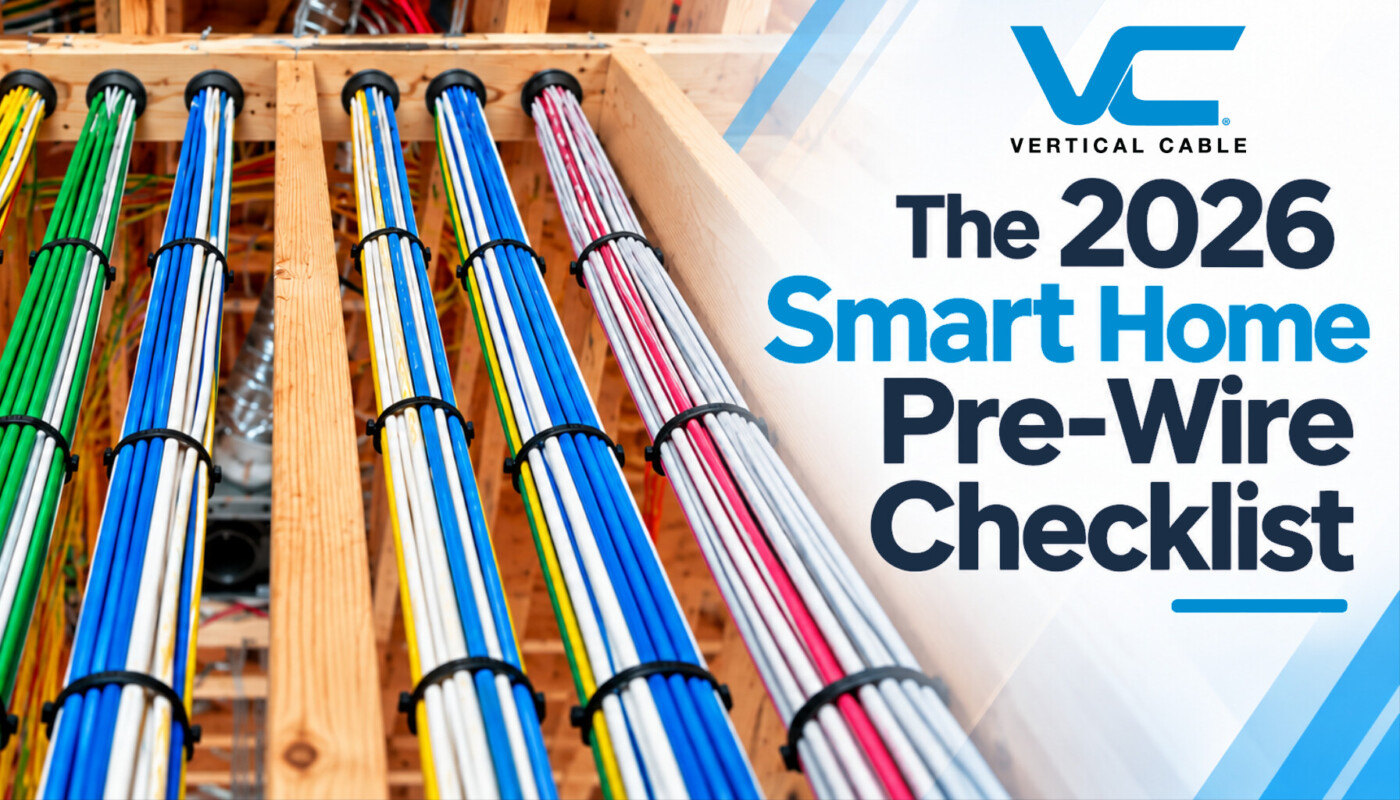
A smart home pre-wire is the one part of a home technology project where you only get one clean shot. Once insulation and drywall go in, every forgotten cable becomes a fishing job, a surface raceway, or a wireless compromise. This checklist covers what to run, room by room. It also covers which cable types and ratings to specify, how to plan the structured wiring panel at the center of it all, and where to leave conduit for technology that doesn’t exist yet. It’s written for homeowners planning a build or remodel, and for the integrators and electricians doing the low-voltage rough-in.
Why Pre-Wire Matters More in 2026
Networking now underpins nearly every residential technology project. In CEDIA’s 2026 market research, 88% of firms reported installing home networking in the past year, more than any other system category. Control systems, media rooms, distributed audio, and security all rely on that network, and most perform better over cable than over the air.
The same research found that about three out of four projects begin with the homeowner, not the builder or architect. If you’re a homeowner reading this before calling an integrator, you’re the typical case. The decisions you make before the framing inspection set the ceiling on what your home can do later.
WHAT CEDIA’S 2026 MARKET RESEARCH SHOWS | |
88% of integration firms installed home networking in the past year — the #1 category | 75% of projects originate directly with the homeowner |
Three things have raised the stakes since the last generation of pre-wire guides:
 Wi-Fi moved to the ceiling. Whole-home Wi-Fi now runs on multiple hardwired access points, powered by PoE and connected with multi-gig uplinks. Each one needs its own cable. |  More devices draw power over the cable. Cameras, doorbells, access points, and keypads increasingly run on Power over Ethernet, which puts more weight on conductor quality. |  Built to outlast several tech cycles. A cable that’s “good enough” today may be the bottleneck in eight years. Conduit and spare runs are how you hedge. |
The Room-by-Room Pre-Wire Checklist
Treat the counts below as a practical starting point, not a code minimum. Every home is different, and an integrator walkthrough (more on that below) is where these get finalized. One rule applies everywhere: every run is a home run. Each cable travels uninterrupted from its outlet back to the structured wiring panel or rack, with no splices or daisy-chains.
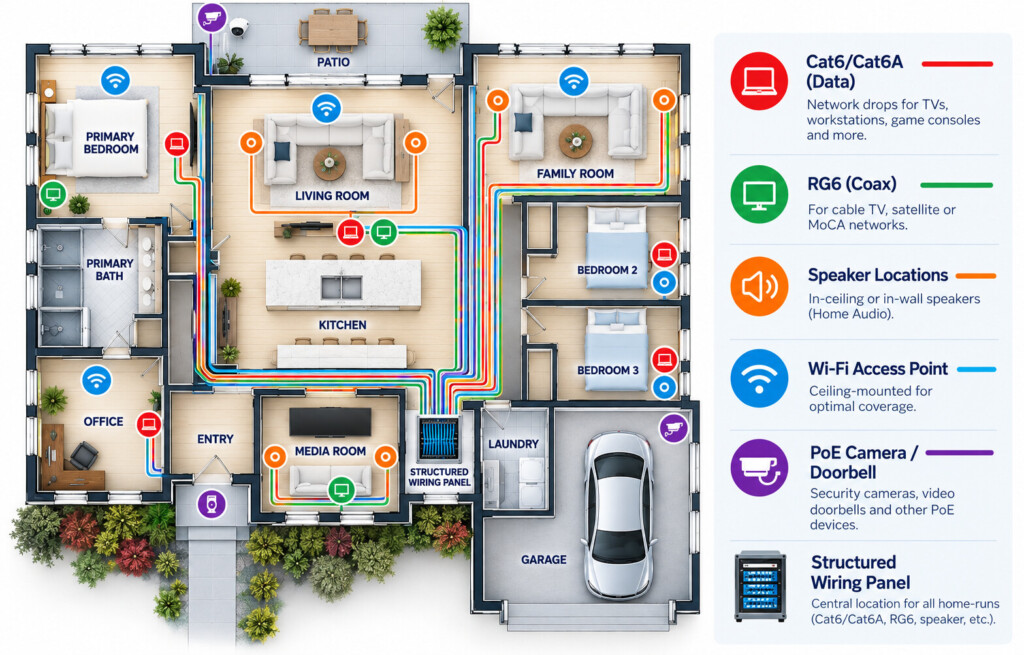
 Living Room / Family Room (Primary TV Wall)
|  Home Theater / Media Room
| |
 Kitchen
|  Bedrooms
| |
 Home Office
|  Ceilings and Hallways (Wireless Access Points)
| |
 Front Door and Exterior
|  Windows and Doors
| |
 Thermostats, Keypads, and Sensors
|  Garage, Basement, and Utility Spaces
|
Cable Types to Run for Home Network Wiring
The checklist calls for a handful of cable types. Here’s what to specify and why.
CAT6 vs. CAT6A
Both support Gigabit Ethernet out to the full 100-meter channel. The difference shows up at 10 Gb: unshielded CAT6 is limited to about 55 meters (180 feet) for 10GBASE-T, while CAT6A is characterized to 500 MHz and supports 10 Gb over the full 100 meters. Category performance for both is defined in the TIA-568.2 series.
CAT6 | CAT6A | |
|---|---|---|
Rated Bandwidths | 250 MHz | 500 MHz |
Gigabit Ethernet | Up to 328 ft. (100 mm) | |
10 Gb (10GBASE-T) | Up to 180 ft. (55 mm) | UNSHIELDED | Full 328 ft. (100 mm) |
Best Pre-Wire Use | Bedrooms, TVs, kitchen, general device drops | Access points, home offices, media rack, PoE-heavy and multi-gig runs |
Install Note | Smaller diameter, easier in tight boxes | Larger diameter: size conduit and boxes accordingly |
The practical split: use CAT6 for general drops to bedrooms, TVs, and devices. Use Cat6A for access points, the home office, the media rack, and any run you expect to carry PoE or multi-gig traffic. Our CAT6A bulk cable uses 23 AWG solid bare copper conductors with a CMR riser rating. It supports PoE Type 4 (IEEE 802.3bt), which gives you the headroom you need for ceiling access points and cameras. For standard drops, CAT6 bulk cable covers everything else.
Many builders now run Cat6A everywhere to avoid mixing inventory. That works too, but plan for its larger diameter when sizing conduit and boxes.
RG6 Coax
Coax still matters for antenna TV, satellite, cable internet entry, and MoCA networking over existing coax. Specify quad-shield RG6 that is sweep-tested to 3 GHz to cover satellite frequencies. Our RG6 coax is 18 AWG quad-shield, sweep-tested to 3 GHz, and carries a CM/CL2 rating for in-wall use. Run it from the service entrance to the panel and to TV locations.
Speaker Wire
For in-wall and in-ceiling speakers, 16 AWG or 14 AWG stranded copper with a CL2 or CL3 in-wall rating is the norm. Use 2-conductor runs for single speakers and 4-conductor runs for stereo pairs or volume controls. Gauge depends on run length and speaker impedance.
Security and Sensor Wiring
Door and window contacts, motion sensors, and keypads typically use low-voltage multi-conductor alarm cable. Confirm the conductor count and gauge with your security system’s specifications before rough-in, since panels vary.
Lighting Control and Shades
Lighting control keypads and motorized shades are the most system-specific runs on this list. Some systems use CAT6, others use proprietary low-voltage cable, and some shades need dedicated low-voltage power. Pick the system before rough-in, or run CAT6 plus a spare pathway to every likely location.
Jacket Ratings: What the Code Expects
Fire ratings matter even in a single-family home. Under NFPA 70 (the National Electrical Code), communications cable in walls is typically rated CM or higher (CMR for runs between floors). Speaker and Class 2 control cable is rated CL2 or CL3. Plenum-rated cable (CMP) is only needed in air-handling spaces. Code adoption varies by jurisdiction, so confirm which NEC edition your local inspector enforces.
RATING | WHAT IT IS | WHERE IT SHOWS UP IN A HOME |
|---|---|---|
CM | Communications Cable, General Purpose | In-wall network and coax runs on a single floor |
CMR | Communications Cable, Riser | Runs between floors; can substitute for CM |
CMP | Communications Cable, Plenum | Air-handling spaces only; rarely needed in a home |
CL2 | Class 2 Cable | In-wall speaker wire and low-power control cable |
CL3 | Class 3 Cable | Higher-power Class 3 circuits; can substitute for CL2 |
The Structured Wiring Panel and Network Rack
The structured wiring panel, also called a structured media panel or media enclosure, is where every home run terminates. It houses the patch panel, network switch, coax splitter or MoCA hardware, and the internet provider’s equipment. It’s the hub of the entire pre-wire, and its location deserves as much thought as any room on the checklist.
Where to Put the Structured Wiring Panel
| When to Step Up to a Network RackA flush-mount structured wiring panel works well for most homes with a modest number of runs. For larger homes, homes with a dedicated media room, or projects with dozens of CAT6A runs plus PoE switching, an equipment rack is the better choice. It gives you real ventilation, proper cable management, and space for a UPS. A wall-mount enclosure in a utility room or closet is the common middle ground. See our rack enclosures for wall-mount and open-frame options sized for residential installs. Whichever you choose, label both ends of every cable and keep a simple map of what each port feeds. It saves the next technician hours, and that technician may be you. |
Conduit and Pull Strings for Future Upgrades
Conduit is the cheapest insurance in a pre-wire. You can’t predict which cable your home will need in 2035, but you can make sure you’ll be able to pull it.
- Panel to attic and panel to basement or crawlspace. These two pathways let you reach almost any wall in the home later.
- TV locations to the equipment location, for HDMI, fiber, or whatever replaces them
- Service entrance to panel, for fiber internet upgrades
- Exterior sleeves under hardscape, as noted in the exterior checklist
- Pull strings in every conduit. Leave a pull string (or two) in every run, tied off at both ends.
Conduit is the cheapest insurance in a pre-wire. You can’t predict which cable your home will need in 2035, but you can make sure you’ll be able to pull it.
Working With an Integrator on Your Pre-Wire
Because most projects start with the homeowner, it pays to engage an integrator early, ideally before framing is complete. A good low-voltage contractor will want to do three things:
-
Framing
Studs and joists go up. Walk the house and mark every TV, speaker, access point and camera location.
-
Electrical rough-in
The electrician sets boxes and pulls power. Plan low-voltage paths to stay clear of parallel power runs.
- Low-voltage windowLast cheap chance to add runsLow-voltage rough-in
Pull Cat6/Cat6A, coax, speaker wire and fiber to every location while the walls are open.
-
Test & photo every run
Test and label both ends of each cable, then photograph every wall bay before it closes.
-
Insulation
Wall cavities fill up. Adding a cable now means fishing it through insulation.
-
Drywall & paint
Walls close. A missed run now means cutting, patching and repainting.
-
Trim-out & equipment
Jacks, wall plates, speakers, the rack and network gear are installed and terminated.
- Hold a pre-wire walkthrough. You, the integrator, and ideally the builder walk the framed house with this checklist and mark every outlet, speaker, access point, and keypad location on the studs.
- Coordinate timing. Low-voltage rough-in usually happens after electrical rough-in and before insulation. Trim-out (terminations, plates, and equipment) happens after drywall and paint.
- Test before drywall. Test every run for continuity and correct termination before the walls close. Photograph and measure every wall before insulation goes in, too; those photos are invaluable later.
Questions worth asking any integrator you’re considering:
To find a qualified professional, CEDIA’s Find a Smart Home Professional directory lists member integrators by location and specialty. Residential cabling practice is guided by ANSI/TIA-570-E, the Residential Telecommunications Infrastructure Standard. It covers cabling for voice, data, video, security, audio, and control systems in single- and multi-dwelling homes, and it’s worth asking whether your integrator designs to it.
Frequently Asked Questions
What is a structured wiring panel?
A structured wiring panel is a central enclosure where all of a home’s low-voltage cables terminate: network, coax, and sometimes phone and security. It typically houses a patch panel, a network switch, and the internet provider’s equipment. Every outlet in the home runs back to it so that you can connect or reconfigure any room from one place.
What is low voltage wiring in a house?
Low-voltage wiring carries data, signals, or small amounts of power, not standard household electrical current. In a home, that includes Ethernet (CAT6/CAT6A), coax, speaker wire, security and sensor cable, thermostat wire, and doorbell wiring. Install it with different rules than line-voltage wiring, and keep it separate from it in the walls.
What is a pre-wire meeting?
A pre-wire meeting is a walkthrough of the framed home, before insulation, with the homeowner, the low-voltage integrator, and often the builder. The group confirms and marks every cable location: TVs, speakers, access points, cameras, keypads, and the structured wiring panel. It’s the last chance to add runs cheaply, so bring this checklist.
How do you pre-wire for surround sound?
Run CL2- or CL3-rated speaker wire (typically 16 AWG or 14 AWG) from the equipment location to every planned speaker position, including surrounds, height channels, and the subwoofer. Finalize the speaker layout before rough-in, label each run, and add conduit between the display and equipment locations for future video cables.
Should I pre-wire for motorized blinds?
Yes, if you want them. Retrofitting power and control wiring to window headers after drywall is expensive and invasive. Even if you don’t install shades now, running wiring to likely window locations during rough-in costs little and keeps the option open. Check your shade system’s wiring requirements first, since they vary by manufacturer.
PLANNING A PRE-WIRE? Vertical Cable stocks CAT6, CAT6A, and RG6 options for every part of a pre-wire install. Not A Vertical Cable Distributor Yet? Apply For An Account And Our Team Will Get You Set Up. |